Project Tracing
🔗 Original page — Source of this material
Description
Here, tracing means tracking project execution by recording or displaying the sequence of steps performed by the program. It helps you analyze a template: debug it, measure execution speed, and locate errors.
To start tracing in ZennoPoster, use the task panel: right-click the task → Trace execution.
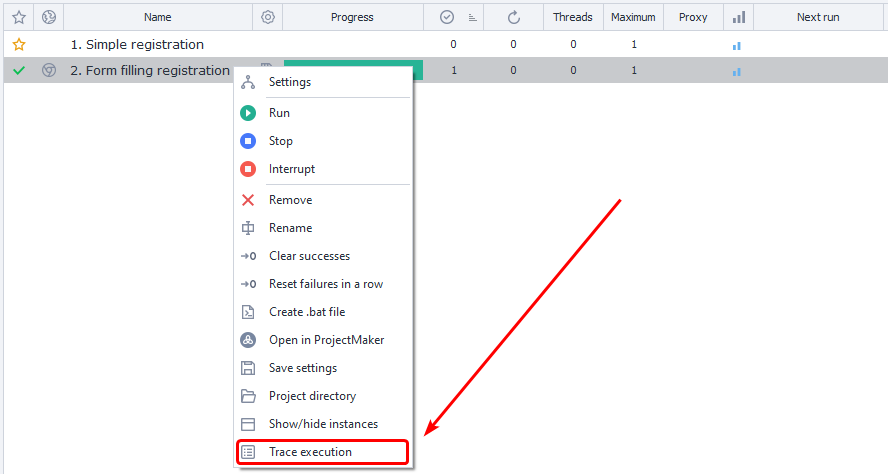
Tracing begins working immediately after it is enabled, recording the current action and then proceeding in order.
File save location for results
The files are located in your user directory: C:\Users<USERNAME>\Documents\ZennoLab\Traces and are organized by task.
The log format is as follows
<Event Time>|<Message Status>|<Action ID>|<Execution Time (ms)>
Possible message statuses
Info - informational message;
In - indicates the start of executing the action with the specified ID;
Good - successful execution of the action with the specified ID, moving to the green branch;
Bad - unsuccessful execution of the action with the specified ID, moving to the red branch.
Example contents of a trace file
23-02-2021 06:09:17.9110|In |cca-1035|
23-02-2021 06:09:20.5203|Good|cca-1035|2520
23-02-2021 06:09:20.5525|In |8c7d7d95-d574-43a5-a677-6ebc17490caf|
23-02-2021 06:09:27.3366|Good|8c7d7d95-d574-43a5-a677-6ebc17490caf|6721
23-02-2021 06:09:27.3571|In |03aa3431-0d85-4374-ad32-2821d22f1674|
23-02-2021 06:09:27.3708|Good|03aa3431-0d85-4374-ad32-2821d22f1674|3
23-02-2021 06:09:27.3893|In |re-2884|
23-02-2021 06:09:28.3229|Good|re-2884|918
23-02-2021 06:09:28.3356|In |00b6f04c-711c-4362-9404-f8fb2fdf5a51|
23-02-2021 06:09:28.3463|Good|00b6f04c-711c-4362-9404-f8fb2fdf5a51|0
23-02-2021 06:09:28.3571|In |re-4835|
23-02-2021 06:09:29.0290|Good|re-4835|661
23-02-2021 06:09:29.0455|In |67c9448b-ebbe-4f54-8206-868f8ddc38c3|
23-02-2021 06:09:29.0612|Good|67c9448b-ebbe-4f54-8206-868f8ddc38c3|2
23-02-2021 06:09:29.3509|Info|---Project Executed---|
Example usage
Sometimes task execution hangs, and the standard interface does not show exactly where it stopped. Tracing helps in these less obvious situations. As soon as you enable it, the system immediately records the problematic step and writes detailed information about the current action to the log file for further analysis.