Using Directives and Shared Code
🔗 Original page — Source of this material
Description
Starting with ZennoPoster version 7.3.2.0, you can connect Visual Studio. For detailed instructions, see the Visual Studio Project article.
Shared code is a feature that extends the capabilities of standard C# actions. It’s used to add extra classes and functions.
Using directives let you access functions and classes, as well as create namespaces.
How can you use it?
- Work more efficiently with C# code.
- Create new namespaces.
- Organize large amounts of code.
- Avoid namespace conflicts.
How do you add an action to a project?
From the context menu: Add action → Custom code → Using directives and shared code
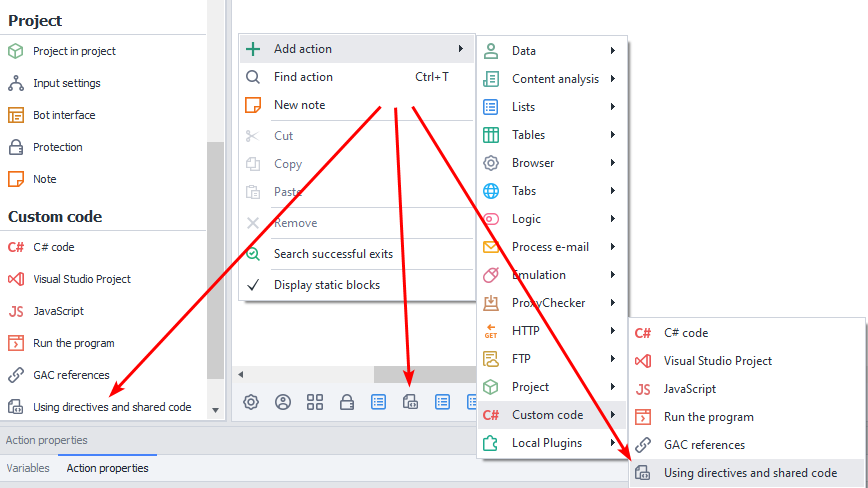
When you add an action in the Static blocks panel, the corresponding block will appear.
Shared Code
This window is a code editor with syntax highlighting. Its context menu gives you access to basic code editing features: copy, paste, commenting, search, replace, and so on.
At the bottom of the window, there’s a checkbox that lets you load code from a .txt or .cs file.
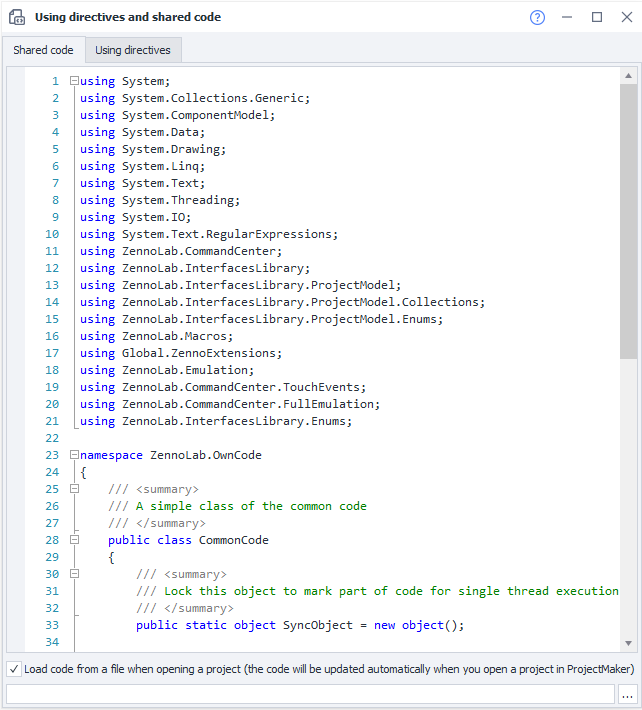
All using directives used in the project are listed first. Next, there’s an example of declaring namespace ZennoLab.OwnCode. You can create your own namespaces in the same way and use them later.
To access functions and methods in shared code, declare them with the public modifier. If you don’t need to work with objects of a particular class, you can declare it as public static. And if inheritance won’t be needed, it’s best to declare the class as public sealed from the start.
instance or project entities from shared codeUnlike in C# actions.
To work with an instance, initialize these objects using new:
(Instance instance = new Instance("127.0.0.1", 40500, "server");)
or pass them as function arguments.
The same applies to project variables: pass their values as function arguments.
Using Directives
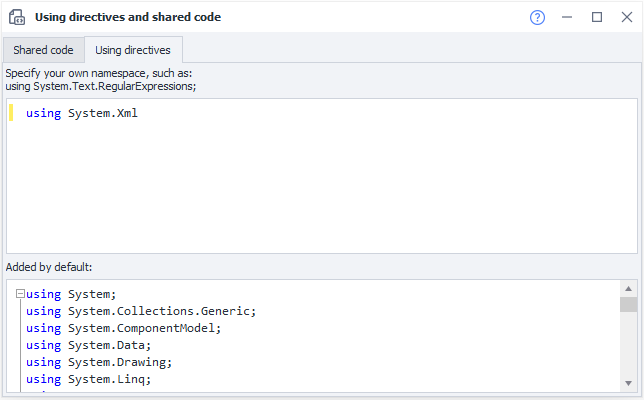
When you switch to this tab, you’ll see two fields:
- Top. Use this field to add namespaces that are used when running code in C# actions. For example, to parse XML, enter
using System.Xml;. - Bottom. This field lists all the using directives used by the project by default. You can’t edit them.
Fine-tuning the code editor’s appearance
Added in ZennoPoster 7.2.1.0.
These settings affect both «Using directives and shared code» and how code is displayed in the C# code action.
You can customize the code editor’s colors. The SyntaxEditorColors.json file is located in %AppData%\ZennoLab\ZennoPoster\7\ProjectMaker. Colors for the light and dark themes are configured separately, using RGB values or color names.
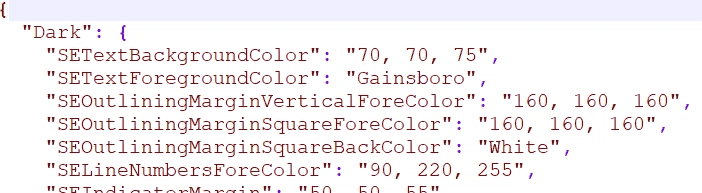
Example.
Passing an instance to shared code: HtmlClick
In this example, the instance object is passed to the HtmlClick function as an argument. The function searches for an HTML element by its attributes and clicks it. If the element is found, it returns the string success; otherwise, it returns fail.
namespace ZennoLab.OwnCode
{
    public class CommonCode
    {
        public static string HtmlClick(Instance instance)
        {
            HtmlElement element = instance.ActiveTab.FindElementByAttribute("div", "class", "html", "regexp", 0);
            if (element.IsVoid)
            {
                return "fail";
            }

            element.Click();
            return "success";
        }
    }
}
To call the function from a C# action, use:
return ZennoLab.OwnCode.CommonCode.HtmlClick(instance);
This is useful when there are multiple places in a project where you need to click the same element.
Changing image opacity: SetImageOpacity
Pass an image and an opacity value to the SetImageOpacity method. It returns a semi-transparent image that you can save to disk.
public static Image SetImageOpacity(Image image, float opacity)
{
    try  {
		Bitmap bmp = new Bitmap(image.Width, image.Height);
        //создание графики из картинки
        using (Graphics gfx = Graphics.FromImage(bmp)) {
            //создание объекта color matrix
            ColorMatrix matrix = new ColorMatrix();
            //установка прозрачности
            matrix.Matrix33 = opacity;
            //создание новых атрибутов
            ImageAttributes attributes = new ImageAttributes();
            //установка цвета прозрачности картинки
            attributes.SetColorMatrix(matrix, ColorMatrixFlag.Default, ColorAdjustType.Bitmap);
            //отрисовываем картинку
            gfx.DrawImage(image, new Rectangle(0, 0, bmp.Width, bmp.Height), 0, 0, image.Width, image.Height, GraphicsUnit.Pixel, attributes);
        }
        return bmp;
    }
    catch (Exception ex) {
        return null;
    }
}
Here’s how to call this function from a C# action:
Image img = OwnCode.CommonCode.SetImageOpacity(Image.FromFile(project.Directory + "//image.jpg"), .5f);